
Physical Address Extension – PAE
PAE este reprezinta o solutie oferita de Intel (functioneaza pe platforme Intel) pentru extinderea limitarii de memorie fizica la mai mult de 4GB pentru sisteme de operare cu o arhitectura pe x86.
Sistemele Microsoft care suporta PAE sunt Windows 2000, Windows XP, Windows Server 2003, Windows Server 2008 doar pe x86. PAE nu este suportat pe x64.
| Sistemul de operare | Memoria maxima suportata cu PAE |
| Windows 2000 Advanced Server | 8 GB of physical RAM |
| Windows 2000 Datacenter Server | 32 GB of physical RAM |
| Windows XP | 4 GB of physical RAM* |
| Windows Server 2003 Standard Edition | 4 GB of physical RAM* |
| Windows Server 2003, Enterprise Edition | 32 GB of physical RAM |
| Windows Server 2003, Datacenter Edition | 64 GB of physical RAM |
| Windows Server 2003 SP1, Enterprise Edition | 64 GB of physical RAM |
| Windows Server 2003 SP1, Datacenter Edition | 128 GB of physical RAM |
| Windows Server 2008 Standard | 32 GB of physical RAM |
| Windows Server 2008 Enterprise | 128 GB of physical RAM |
| Windows Server 2008 Datacenter | 128 GB of physical RAM |
Kernelul pentru PAE necesita procesor cu arhitectura Intel, x86, Pentium Pro sau mai nou, mai mult de 4GB de RAM, Windows 2000, XP, Server 2003, Server 2008. Desi PAE este de multe ori asociat cu marirea capacitatii de memorie el mai porneste si hardware enforced Data Execution Prevention (DEP).
Data execution prevention reprezinta un set de tehnologii Hardware si Software pentru a proteja sistemul de exploatari malitioase de coduri. Incepand cu tehnologiile Server 2003 SP1 DEP este activat si hardware si software. Hardware DEP marcheaza locatiile de memorie dintr-un proces ca si non-executabile decat daca locatia respectiva contine un cod de executare specific. Exista atacuri ce incearca sa introduca si sa execute coduri din partea de memorie non-executabila dar DEP previne aceste atacuri, interceptandu-le si ridicand o eventuala exceptie.
Windows activeaza automat PAE daca DEP este pornit pe un computer ce suporta hardware enabled DEP sau daca computerul este configurat sa faca hot-add (Datacenter) la memorie de peste 4GB.
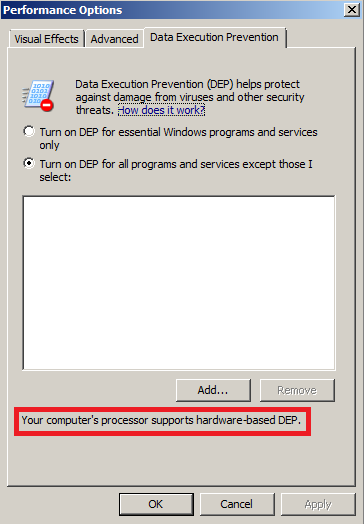
Daca calculatorul nu suporta hardware-enabled DEP sau nu este configurat pentru hot-add, atunci PAE trebuie activat manual.
Pentru a activa PAE se va foosi comanda BCDEdit /set pentru a seta optiunea de boot:
- bcdedit /set [{ID}] pae ForceEnable
Daca DEP este activat, PAE nu poate fi dezactivat. Folositi comanda BCDEdit /set pentru a dezactiva si DEP si PAE:
- bcdedit /set [{ID}] nx AlwaysOff
- [{ID}] – pentru setari default nu treceti nici un ID.
- bcdedit /set [{ID}] pae ForceDisable
Windows Server 2003 and Windows XP: Pentru a activa PAE, foloseste parametrul /PAE in fisierul boot.ini. Pentru a dezactiva PAE, folositi /NOPAE. Pentru a dezactiva DEP, folositi parametrul /EXECUTE.Daca aveti comentarii sau sugestii sunt binevenite.
 Marius Ene
unde scriu astea bcdedit /set [{ID}] pae ForceEnable ? am windows xp sp3 32 bit am 4gb ram imi citeste 3.12 si sub ram zice Physical Adress Extention te rog mult ajuta-ma si pe mn sa citeasca 4gb ram